After searching over 100 resources collections and lists from Canada, the U.S., U.K. and Australia, we have developed a fully vetted collection of workbooks, modules and activities that address a range of instructional topics in our Open Educational Resources and Instructional Materials Collection.
To build the collection, Christine and Guylaine assembled a group of instructors from school boards and community groups, representing urban and rural communities across the province. Members work in program areas ranging from workforce development to academic, with diverse learner groups. They provided guidance to ensure the materials are
- Free and ad-free
- Shareable and reproducible
- Mostly modifiable for use in different formats and to change content
- Ready-to-use with instructional activities
- Accompanied by tips, ideas and strategies for educators to implement.
Take some time to explore the collection. You’re sure to find some gems that you can use right away.
Learn how to use Google Slides to create activities that learners can do alongside each other individually or in groups.
Check out the presentation below to see how. Click on the full screen icon (two arrows) in the bottom right corner to see a larger version.
To find templates for creating collaborative workspaces in Slides, check out the collection at Ditch that Textbook: ditchthattextbook.com/resources/templates
To see how we have used Slides this way, take a look at some of the samples in the Collaboration Slides Folder.
If you’d like to learn more about using Google slides as a collaborative workspace or schedule a demonstration, contact Tracey or our Quick Tech Help service.
Another way to create spaces for collaborative is to use a whiteboard or a a Padlet Board.
Padlet has introduced a digital whiteboard they are calling Sandboxes. The sandboxes are different from the Padlet Boards. Padlet Sandboxes have similar features to Jamboard* plus extras. The communication tools include voice recordings, drawing, typing, sticky notes, shapes and video uploads. You can create a slide show and play it like a slide presentation or use it as an activity board. There is a set of education templates that can help you get started. You can have different groups working on different cards (frames or pages) and prevent them from seeing what others are doing. Here is one we made for a workshop in June 2025: Ideas from teachers (It is “frozen” so you cannot add to it but you can remake it). The Sandboxes can be integrated with Google Drive and Classroom. Padlet does not require users to create accounts to participate on the Sandboxes. Padlet allows you to have three active Sandboxes and Boards on a free account. You can store your old work but you can only have three working at one time. They have several tiers of pricing that allow for more Sandboxes and Boards to be active and for different numbers of editors per Sandbox or Board. (We made a Padlet Tip Sheet that explains how to use the Boards.)
You might have heard about MTML’s smartphone learning modules but we want to go a bit deeper to explore how they are applied in the literacy field and what other programs are doing when it comes to using smartphones with their learners. In this showcase, we explored the modules and discussed how smartphones are changing the way we learn, teach and use technology on a daily basis.
Presenters
Metro Toronto Movement for Literacy
Also known as MTML, is a network of organizations and individuals supporting adult literacy in Toronto and York Region.
Ambreen Ahmad, Managing Director
Ambreen has 20 years of experience in the education field. Possessing a Masters in English Literature and in Educational Planning and Management, she has maintained successful positions as a Vice Principal, English Language Instructor, Manager HR, Communication Executive and Literacy practitioner.
Currently, she is working as a Managing Director at Metro Toronto Movement for Literacy, a non-profit organization that supports adult literacy in Toronto and York Region. Her previous work experience and life-long learning certificates and diplomas bring a wealth of information to develop learning strategies, recruitment procedures and governance.
Her dedication and determination in helping individuals grow and develop are highlighted in all her professional achievements. She is also passionate about volunteering and has been an ardent volunteer in many non-profits across GTA. She loves to cook and paint in her free time.
LAMP Adult Learning Program provides a foundation to the first step back to learning, with a strength based community approach. Learners achieve health and well being, develop independence, further education for training and employment needs. They focus on personal goals of health, civic engagement, social inclusion, and quality of life. Learners improve their reading, writing, and/or digital literacy (smartphone, ipad and laptop/desktop) skills in our community-based literacy and basic skills program.
Johanna Milic
Program Supervisor
Leads creative development and collaboration with Support Organizations and
in programs at LAMP.
Anita Dhanjal
Community Literacy Worker
Digital and Computer, Reading and Writing Instructor.
Robert Connelly
Community Literacy Worker
Digital and Computer, Reading and Writing Instructor.
Literacy Council York Simcoe (LCYS)
The Skills Upgrading Center provides customized training programs and job-specific workshops to assist adults in York-Simcoe in improving their employment prospects, preparing for a higher education, and acquiring the skills they need for a successful future.
Brittany Horlings, Program and Marketing Assistant
ADDITIONAL RESOURCES MENTIONED BY PARTICIPANTS
AlphaPlus OER Library – Mobile Devices
How to scan QR codes on Android Phone
How to scan QR code from an image in gallery
Computer Hope – computer dictionary, terms, and glossary
Connected for Success – Low income affordable plans from Rogers (mobile, internet and TV options)

On November 16, 2023 AlphaPlus hosted our 12th Community Gabfest.
The theme was Games and gambits – keeping learning fun.
We used a Jamboard to guide our conversation: Wayfinders Gabfest 12 Jamboard.
The conversation starter was “What are your favourite games or community building activities to use with learners?”
This gabfest was about the games and activities learners love. We shared our ideas for keeping learners engaged by building community and having fun together.
We started by talking about the games we like and why we like them and then we played a general knowledge Kahoot! that Guylaine had made for us.
We shared some resources:
- Gamified Curriculum from Literacy Link South Central – www.llsc.on.ca/gamification
- Showcase on Games from AlphaPlus – alphaplus.ca/resources/virtual-showcase-should-we-kahoot-it
- Building Community Tip Sheet from AlphaPlus – alphaplus.ca/resources/building-community-in-remote-learning-environments
- Digital Learning Selector from New South Wales Department of Education – app.education.nsw.gov.au/digital-learning-selector (This website provides numerous ideas for active learning and assessment activities with templates you can adapt.)
Then we asked:
What are your favourite games or community building activities to use with learners?
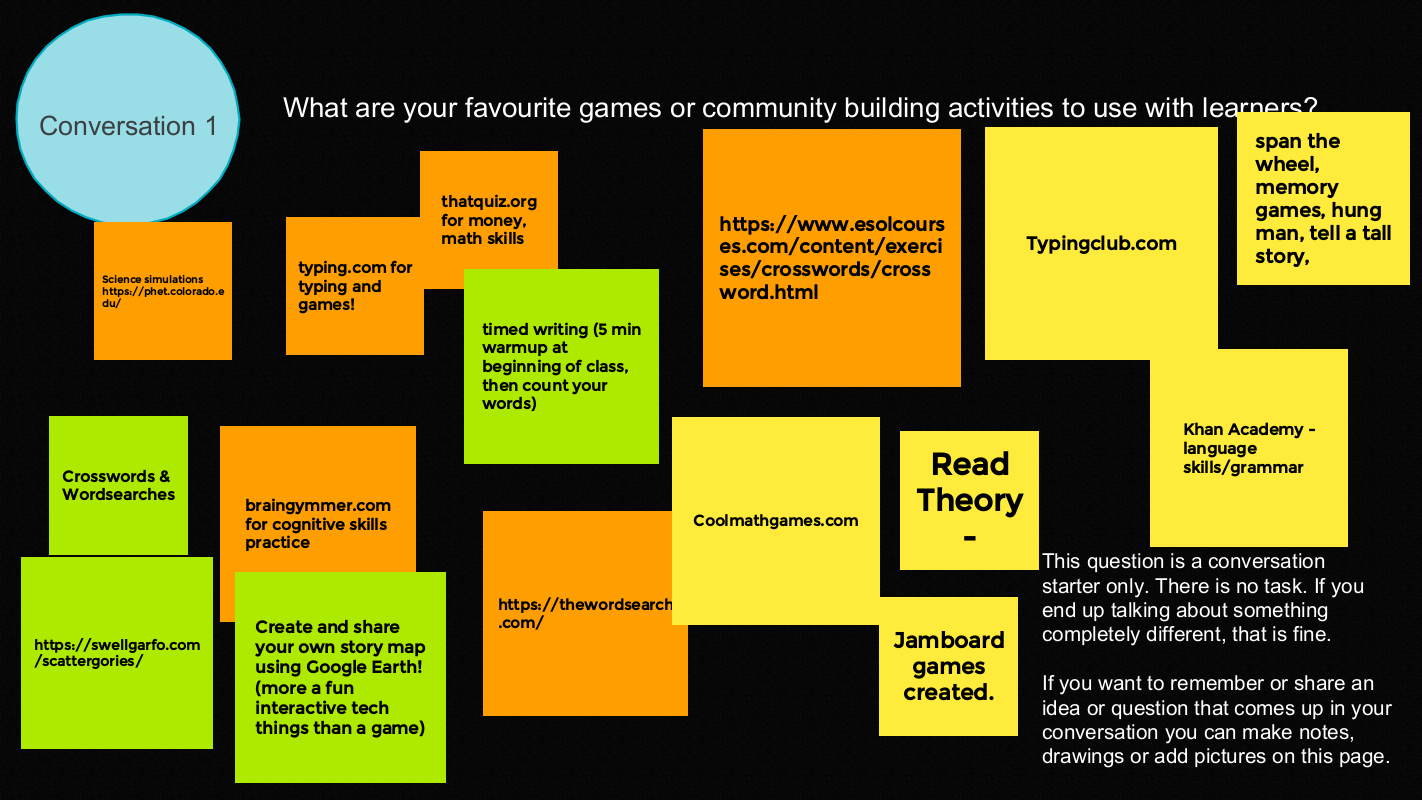
Favourite games and activities
- Create and share your own story map using Google Earth (more a fun interactive tech thing than a game)
- Timed writing (5 min warmup at beginning of class then count your words)
- Spin the wheel, memory games, hang man, tell a tall story.
- Jamboard games –
- Put one letter on a sticky note to spell out a word or phrase. Learners make as many words as they can with the letters.
- More examples here – or at Jamboard Tip Sheet and samples
Language
Crosswords & Wordsearches
- thewordsearch.com
- thewordsearch.com/hangman www.esolcourses.com/content/exercises/crosswords/crossword.html
- swellgarfo.com/scattergories
Math and Science
- phet.colorado.edu (science simulations)
- braingymmer.com
- coolmathgames.com
- thatquiz.org (money and math skills)
Typing
Thank you Gabfesters for your collegiality and for sharing your knowledge and sense of fun.
What is formative assessment?
- An evaluation done during the learning process.
- It informs the learner and the instructor about what has been learned or what needs to be improved.
- It generally targets specific learning.
In this short presentation, you will find:
- Information on the use of quiz tools for formative evaluation.
- A comparison table of the features of Kahoot and Quizizz tools.
Since many learners have access to mobile phones and use them on a daily basis, literacy programs started using texting to engage with their clients.
Jane Wouda, the Lead Instructor at the Training & Learning Centre of Renfrew County talked to us about the software they use at the program and the benefits/changes they have noticed.
Paul Crane, Founder and CEO of Local Text Marketers provides texting software (including a custom phone number to display when sending a text). Paul demonstrated how CONNECTsms works and answered our questions about texting tools.
On October 19, 2023 AlphaPlus hosted our eleventh Community Gabfest.
The theme was Engaged Learners.
We used a Jamboard to guide our conversation: Wayfinders Gabfest 11 Jamboard.
We started with these questions:
- How do we engage learners?
- How do we know when they are engaged?
- How does learner engagement inform our practice?
We had planned for these questions as well but we did not get that far. Maybe we should have a Gabfest about over-prepping 🙂
- If the learners are engaged, what do you do next?
- If the learners are not engaged, what do you do?
- Can technology help with learner engagement?
- Can technology support flexibility over the pace of learning?
- Can technology empower learner voice and choice over learning pathways?
- Can technology support learner choice over the time and place of learning?
Before we got into the nitty gritty we warmed up by introducing ourselves in two words:
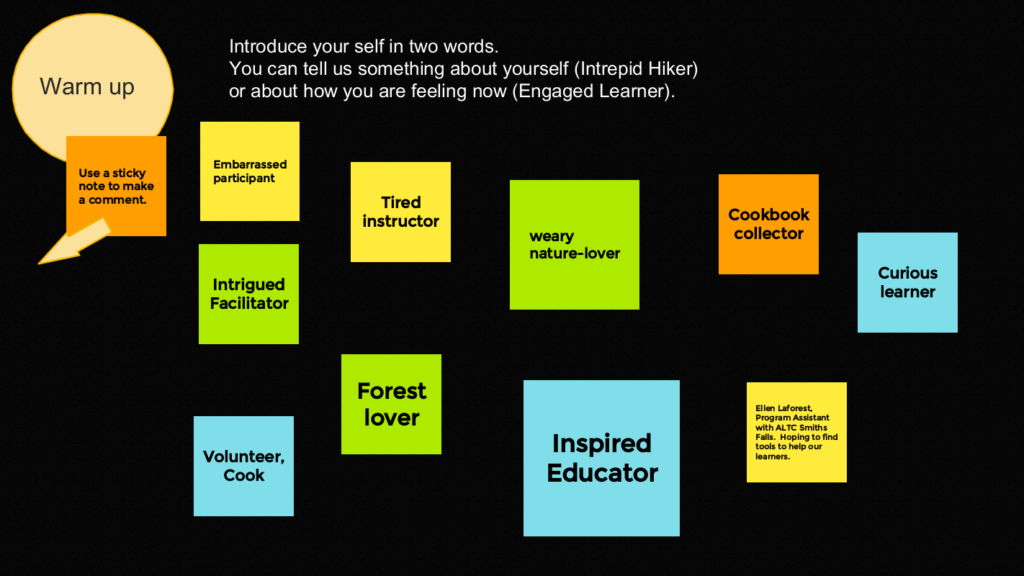
Then we thought about our own engagement. What keeps us engaged when we are learning and what can be barriers to engagement.
The things that help us stay engaged are:
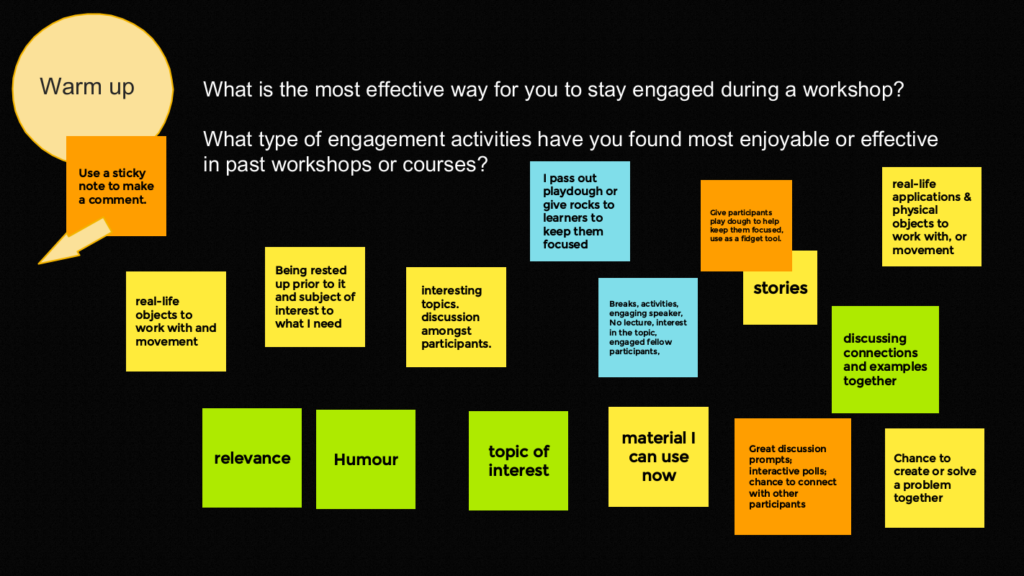
- Relevance, humour, topic of interest and stories.
- Real-life applications & physical objects to work with, or movement.
- Give participants play dough to help keep them focused, use as a fidget tool.
- Being rested up prior to it and subject of interest to what I need.
- Interesting topics. discussion amongst participants.
- Breaks, activities, engaging speaker, no lecture, interest in the topic, engaged fellow participants.
- Discussing connections and examples together.
- Great discussion prompts; interactive polls; chance to connect with other participants.
- Chance to create or solve a problem together.
- Material I can use now.
Somebody asked about the playdough strategy:
- If I have something to fidget with, it helps me actually listen better because I’m not keeping it all in trying to be still.
- It works for me because I am a fidgety person and so if I have something to fidget with then I’m not getting antsy. I’m fiddling with something in a more constructive way.
- I think playdough is quiet versus somebody clicking their pen clicking so the playdough is a good idea.
- Maybe it gives people permission to play and shows that not everybody has to act the same way all the time. When they’re in the workshop, if they feel like playing with playdough and making little little sculptures or if they want to stand up or if they just need to be acting in a different way, that’s okay. As a facilitator, you’re demonstrating that there’s different ways that people can be in the room. I don’t know if that helps people stay engaged and focused and not feel out of place or that they’re doing something wrong. I feel like that concern about doing something wrong can be a big hindrance to engagement. If people are are scared that they’re going to do the wrong thing, say the wrong thing or or end up being the embarrassed participant it can be a barrier to participation.
- I also like the idea. When you have a doodler who is drawing on sheets of paper, they are paying attention but their focus is on the paper. Somebody who’s got something in their hand is more likely to be looking at you. And there’s there’s that connection versus looking down at a piece of paper.
The barriers to engagement are:
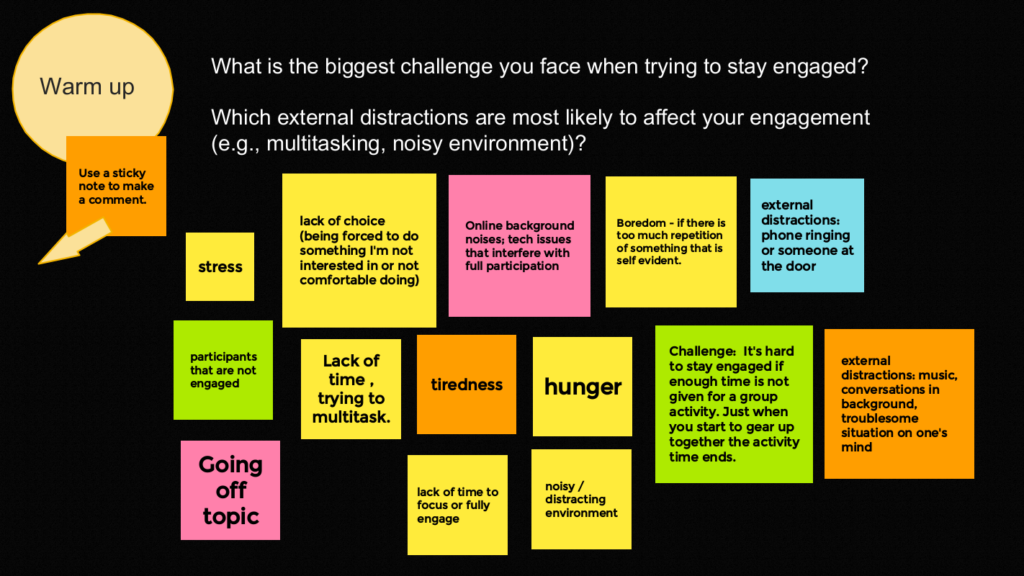
- Stress. Tiredness. Hunger.
- Going off topic.
- Participants that are not engaged.
- Lack of choice (being forced to do something I’m not interested in or not comfortable doing).
- Boredom – if there is too much repetition of something that is self evident.
- Online background noises; tech issues that interfere with full participation.
- External distractions: phone ringing or someone at the door.
- External distractions: music, conversations in background, troublesome situation on one’s mind.
- Noisy / distracting environment.
- Lack of time to focus or fully engage.
- Lack of time, trying to multitask.
- It’s hard to stay engaged if enough time is not given for a group activity. Just when you start to gear up together the activity time ends.
We had a conversation about some of the points that resonated with us.
- I really appreciate the lack of choices comment because sometimes I’ve given a task, especially in breakout rooms, and I’ve heard from learners that they got off topic. I say, “Well, then you should have taken that topic and run with it.” Maybe giving permission to people to just run with what’s really top of mind and reminding people that they can do that is important – so that that one resonated for me.
- I think knowing what the the agenda is–the hunger one tweaked this–knowing that we’re going to break at 12 o’clock and we will have an hour or knowing that the session is two hours so I need to prepare and have something to eat before or after because that hunger, it totally disrupts people’s learning.
- Related to that is knowing what the next topic is going to be by the facilitator; knowing where it’s going to lead to or what’s going to happen helps you direct your focus.
- I agree with that because I am a slower thinker. I feel if the workshop animator is just throwing things at me that I have to try to react to immediately, that’s not where my best ideas come from or where my best thinking comes from. It’s when I have a little bit of time to let things sit and develop in my own mind that I can really contribute well.
- I know a lot of teachers do this without even realizing it, but they kind of play the game where they ask a question and then require participants to “guess what’s in my head” instead of asking more open-ended, thought-provoking questions.
- There is also the difficulty of giving enough time for people to actually think. You never want to leave a void.It is like you dread silences, but sometimes the silences are really productive. We’ve all been trained to be scared of silence instead of seeing it as a fruitful thing. It can be hard because you have people thinking and wanting to communicate at different rates, but if you if you have kind of an overall progression and you let everyone know when you’re going to come together and share things it can take some of the pressure off. It’s always trying to balance the individual needs and ways of participating with having still having some kind of group focus.
We moved into break out rooms to discuss the questions:
- How do we engage learners?
- How do we know when they are engaged?
And here is what the groups reported back:
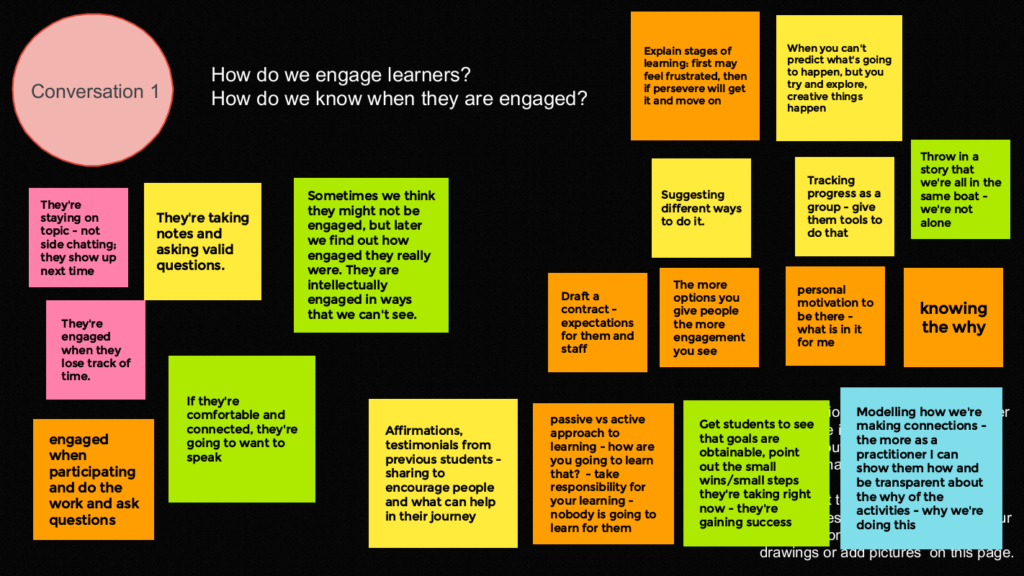
How do we engage learners?
- If they’re comfortable and connected, they’re going to want to speak.
- The more options you give people the more engagement you see.
- Suggesting different ways to do it.
- Get students to see that goals are obtainable, point out the small wins/small steps they’re taking right now – they’re gaining success.
- Personal motivation to be there – what is in it for me?
- Passive vs active approach to learning – how are you going to learn that? – take responsibility for your learning – nobody is going to learn for them.
- Modelling how we’re making connections – the more as a practitioner I can show them how and be transparent about the why of the activities – why we’re doing this.
- Knowing the why.
- Draft a contract – expectations for them and staff.
- Explain stages of learning: first may feel frustrated, then if persevere will get it and move on.
- Tracking progress as a group – give them tools to do that.
- When you can’t predict what’s going to happen, but you try and explore, creative things happen.
- Throw in a story that we’re all in the same boat – we’re not alone.
- Affirmations, testimonials from previous students – sharing to encourage people and what can help in their journey.
How do we know when they are engaged?
- They’re staying on topic – not side chatting; they show up next time.
- Sometimes we think they might not be engaged, but later we find out how engaged they really were. They are intellectually engaged in ways that we can’t see.
- They’re engaged when they lose track of time.
- They’re taking notes and asking valid questions.
- Engaged when participating and do the work and ask questions.
A variation on the question of engagement arose.
- Our biggest issue is people sign up, we get them started and then we don’t see them. Life gets in the way–they change careers or jobs or there are family situations. We’re sending out a weekly email, “Remember, we’re here. What can we do to support you?” But it’s the life changes and the question of how do we how do we re-motivate them to come back and get the job done?
- It’s not that so much the engagement when people in the room with you, but the continuing engagement with the program that we have questions about.
We will think about this as a future Gabfest topic.
Thank you Gabfesters for your engagement :), knowledge, and wisdom.
On September 21, 2023 AlphaPlus hosted our tenth Community Gabfest.
The theme was “Emergent Curriculum”
We used a Jamboard to guide our conversation: Wayfinders Gabfest 10 Jamboard.
We started with these questions:
- What does emergent curriculum mean to you?
- How is it practiced in adult literacy programs?
- How does an emergent curriculum approach engage and empower teachers?
- How does an emergent curriculum approach engage and empower learners?
- How does technology support emergent curriculum?
You can see the responses to the first question on frame 3 of the Jamboard.
We decided to start with the question posed by a participant: Can we also talk about how we understand the word ‘curriculum’?
What is curriculum?
- I have a love hate relationship with the word curriculum because it’s really hard to know what it means. For most of us, we of default to the tangible like the materials—the actual things, the stuff. I’m trying to train myself to think about curriculum, more as a practice than the materials that they’re part of it. Maybe that’s why it’s hard, it’s more of a concept than a tangible thing. And I still don’t like it like I still can’t sit with it well. It’s the practice of teaching and facilitating learning. It’s paying attention to all dimensions, both the tangible the relational, what’s happening between learners between the teachers and the learners and the teachers and the teachers, the learning environment. It’s paying attention to everything that has to do with the practice of teaching and the experience and the practice of learning.
- One of the instructors in a teaching program once said that the curriculum is everything. It’s the color of paint in the room. It’s the way the desks are arranged. Everything is curriculum. I must say it mystified me at the time and sometimes that idea that the design of the room is part of the curriculum mystifies me. I think what she meant was that all of those things signal to students something about what’s about to happen in that room. If the desks are in a circle, people think one thing and if the desks are in rows, they’ll think another thing. Everything is working together to create the approach. The thing with literacy learners is sometimes they’re not that experienced with all of that or if we work with people who come from different places different arrangements, might signal different things to them as well.
- I think I’ve got a narrower view of it. I was thinking more in terms of content and topics and it includes how things are done taking field trips. I think more of the content and topics.
- We work within the OALCF (Ontario Adult Literacy Curriculum Framework) and that’s a curriculum guideline. It’s not a curriculum. It’s a framework for how to shape your curriculum, but not what’s in the curriculum. It’s not prescriptive about an approach but the design of the guide will lead you in certain directions.
Where does pedagogy end and curriculum begin?
- Some of what people have been describing is what I would think of as a pedagogical approach to education as opposed to a curricular approach and I wondered how the two fit together.
- As much as the OALCF is flexible, the fact that it contains tests and is relatively prescribed with levels and level markers, it goes beyond simply an outline of a framework. It’s actually more than that, it has more teeth than that.
- The curriculum framework is the curriculum, but then that’s where the pedagogy comes in is how we implement that or reach that or work with the learners to achieve what’s required in our own way using art the art and science of our practice.
- I don’t think there’s ever an easy answer or an easy separation between pedagogy and curriculum. They must be actually blended together. Curriculum is the content which includes the material and the topics that you’re looking at. Pedagogy to me comes more from a philosophical, ideological way of thinking and believing and valuing about how learning should happen, how teaching should happen. But you can’t have one without the other. And then the word framework gets tossed in there. In many ways, frameworks can reduce everything to some structural thing, or they can open it up to be an expression of guiding principles with suggested content as well.
- We say it’s the process that we use to reach the goal that we’re trying to reach.
- Curriculum feels more like an ideal to strive to, and pedagogy is the nuts and bolts on the ground, what teaching and learning looks like in practice.
- I think when we talk about emerging curriculum, it’s okay for us to have kind of differing ideas of what that means. The bottom line is we’re looking at how we practice facilitating learning, and all the stuff and the ways of thinking that are involved in doing that. I like the word practice more than most, because it makes sense to me, practice and stuff.
What does emergent curriculum mean to you?
- I thought it was a curriculum for emerging low-level learners—a curriculum for emergent readers.
- I love the word emergent. It sounds like the newest and greatest and things that are attention getting and we should study this more and use it and see how it works.
- Developing the curriculum materials and teaching approach while actually teaching and that the curriculum has always been created based on learners’ engagement.
- It’s like planning an event while the event is happening. It’s not so much paying attention to, “Oh, are you on your goal? Or have you reached your goal?” but it’s looking at what’s coming up for the learners, or how learners relate what’s happening in their life now or in the past, or what they’re learning now.
- It’s more of an informal approach to participatory learning—going with the flow, where the conversation leads.
- It is driven by learning goals but also who is in the “room”.
- I imagine it as a curriculum created based on what comes up from learners.
- Emergent curriculum is more ‘alive’ meaning it is created while the learning is occurring based mostly on learners’ engagement.
- It’s what shows up in the classroom while you’re actually teaching, what’s emerging for you to think of the topics that are being brought up and the ways that you can introduce activities based on the ways that people are really engaging. It’s paying attention to how you’re seeing learners actually make meaning when they’re in the class with you. What I’m saying is that you are never fully planned as a teacher. The other way to look at it, you’ve always got to be adapting and trying to stay what just one step ahead. Not a whole lot. Just one is another kind of a way to think about emerging is just a good way to teach, I guess. Hope that makes sense.
We settled on the idea that emergent curriculum is based on the principle that people learn most effectively when they are actively engaged in experiences that are meaningful and relatable to their own lives—when the curriculum accounts for their interests, strengths, needs, and lived realities.
And then a participant asked, “Does emergent curriculum require experiential learning?”
- I was wondering is how aware is the learner of the fact that the curriculum is emerging? Are they given choices? Like are they like that, to me would be experiential. If you’re not simply in the in the back of your head as a teacher reacting in secret? Is it transparent that what the learner was presenting that day is shaping what’s going to happen that day and that becomes more experiential, where they know they can influence what they’re going to be taught that day and how the day is going to go. That’s what I was wondering about, or is it simply on reading the room, I’m going to make a decision that I’m going to move on as a teacher.
- I’ve always thought of experiential learning is more applied learning, learning where you teach them how the skills that you’re using, apply to various tasks that they have to do in real life.
- I see it as learning by doing so. We’re always creating opportunities for learners to practice the things that we’re teaching in terms of basic digital literacy skills.
- I think experiential learning is like the experience of going into the field when you’re on your practicum. I’m training to be a teacher and I’m doing my practicum where I’m doing the job compared to where I’m sitting in the classroom and listening to an instructor and I’m learning.
- I think under the adult learning principles, experiential learning is critical to keeping learners engaged. I always say learners vote with their feet, if they don’t find what they’re doing relevant to what their lives are. We can teach the fundamental skills, but we have to show them how that applies. I think that if learners don’t see the relevance, experientially, it’s hard for them to stay motivated.
Does the teacher involved in emergent curriculum on a day-to-day basis think of it as an exercise of action research?
- I can speak to that. I’m working on my second master’s right now, and I did a research methods class so now I think about everything as a research. I apply it in terms of always asking, “What’s happening here? Who am I not reaching?” and, “How can I adjust what I’m doing to be able to reach more people?” That voting with your feet thing really resonates because if it’s not relevant, and it’s not meaningful, you’re free to walk away. I like that way of thinking of it.
- I can also speak to having done a participatory action research project. We partnered with the women’s shelter across the street. It was all about putting cameras in the hands of the participants and getting them to think critically about what it means to be a part of this community—thinking about the community in a larger scale, taking photos of it, but also thinking about themselves from that perspective. It was very experiential because they were learning new, practical skills in terms of the photography, but it was also emergent in that they were developing the research. I was a researcher, but they were also researchers. All the participants in a participatory action research project are also researchers It opened people’s minds to think about things in different ways and think about the world as a researcher.
- After I teach I usually journal about what I could have done better. I watch how the students are responding and taking everything in. A journal is one way I can reflect upon what I could have done better. The students are responding and journaling honors that and keeps me accountable. I believe that my role is to give the students the tools that they need. The teaching doesn’t really begin until they are away from me when it’s time for them to use what they’ve learned. Journaling really helps to me be aware of what’s happening.
How does an emergent curriculum approach engage and empower teachers?
- I find it absolutely invigorating. I would just lie down and give up if I had to teach the same thing in the same way over and over and over and over again. I just couldn’t do it. I feel like it’s that old saying of seeing yourself as a learner as well. Not the same kind of learner as the learners but I have to learn in order to be an effective teacher. I don’t know about the empowerment—teachers already come in with paychecks and status—but it certainly invigorates me to know that my effectiveness as an instructor highly depends on what I learn from the people who are in the class with me.
- I see it as the teaching and learning is all bilateral. Let me learn from the learners and then we become better teachers. I took a course once they said everything that we that we say should appear somewhere in writing and everything that we write should be read aloud for the different learning styles but that people’s eyes wander and if they’re going to wander, they can wander to that poster on the wall where there’s something that they contributed and it’s very empowering for the learners they feel heard.
- I can say that my greatest dread is for anyone to leave my group session thinking, “Well, that was a waste of time.” I think that’s my motivation to do is to explicitly address what their what their goals are and what they want to know. You always have lots of material ready to go so we can use that but as questions come up, they lead to discussions and learning and then we learn what to do with a new group, you can try those same things. I always put myself in that place of if I were at a workshop and the host just assumed that I didn’t know anything, I wouldn’t have a very good time. I would want them to first find out what I know. Before they tell me.
- We haven’t talked about how working within an emergent curriculum approach helps you build rapport with learners and that when if you have good rapport with learners, and if they basically trust that you have their interests at heart and are always working towards furthering their interests, when things go awry, they’ll go with you. They’ll forgive you for the things that don’t work because you are in a co-creating space. I think it is something you have to work towards with each group. I think there’s work to be done around building the group, making your approach transparent so that they know what’s happening, and building trust. I think it’s there’s some relational pieces in there as well.
And we decided to stop there. This conversation gave us a lot to thing about and raised some questions for the next Gabfest.
- How do we engage learners?
- How do we know when they are engaged?
- How does learner engagement inform our practice?
Thank you Gabfesters for your enthusiasm, knowledge, and camaraderie.
On June 15, 2023 AlphaPlus hosted our ninth Community Gabfest.
The theme was “ChatGPT – delightful or scary?”
This topic came from our discussion at Gabfest 8. We wanted a place to talk about what we are finding delightful about ChatGPT and “some of these things that scare the living daylights out of us. I mean, if we can’t have each other to talk about this, then we are alone in our fear and that’s not a good place to be.”
We used a Jamboard to guide our conversation: Wayfinders Gabfest 9 Jamboard.
We started with a little background on ChatGPT in particular and Artificial Intelligence in general. We shared our experiences and these resources:
ChatGPT Resources
What is ChatGPT? from AlphaPlus: a resource a a resource for teachers/instructors with explanations and ideas for how to use ChatGPT for learning and program administration in an adult literacy setting.
My Digital Companion: Making Sense of ChatGPT from Contact North: a resource for students/learners to help them use this tool safely, ethically and creatively for learning.
ChatGPT: Leveraging AI to Support Personalized Teaching and Learning in the June 2023 Adult Literacy Education Journal by Sarah Cacicio and Rachel Riggs: a resource for teachers/instructors with ideas for how to use ChatGPT for learning in an adult literacy setting.
Leveraging ChatGPT Instead of Banning from Contact North: a resource for teachers/instructors with ideas for how to use ChatGPT for learning in a college setting.
EdTechTeacher Chat GPT Tips by Tom Daccord: a resource for teachers/instructors with ideas for how to use ChatGPT for learning in a K-12 setting. You can find links to the tip sheets in our resource (they are not easy to find on the EdTechTeacher website).
People were asking about text-to-speech options and Guylaine shared this resource: Speech recognition and text to speech tools for various devices
Where we are at
We talked about where we are on the delightful to scary continuum.
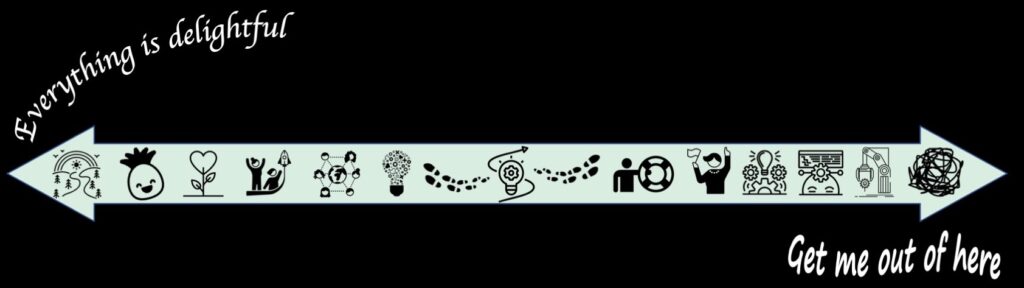
We were pretty much dotted across the continuum.
- “I am generally an optimist. I pretty much see every barrier as an opportunity to learn and that has been my approach to AI.”
- “I’m I’m that green circle right in the very middle. It was in front of me and I was curious and I knew we were having this this meeting. I thought I’d try it. But I approach it with caution.”
- “I live with a software tester and this whole thing makes me very nervous.”
We did not all stay in a fixed place.
As one person said at the closing of the Gabfest, “I felt like I was watching a ping pong game. I was going from one side to the other.” Many of us are in a place where we read one thing and we feel quite positive and then read another that fills us with apprehension.
Here are some of the things people have tried so far:
- I’ve been working with it and playing with it and following teachers across the world, just to learn more about how they’re using it.
- I tried it a little bit just before the meeting. I asked it to make up five questions for time elapsed – for example, if you left work at this hour and drove 45 minutes, what time do you get home? It was so quick so I can see it as a resource for us making up something quickly for students.
- It popped up on my screen on Bing and I decided to start asking questions. I did it because I was stuck on something. I was putting a presentation together on values and I was looking for just a short two minute video that would make it simple, and there is nothing. So I asked it to give me a brief presentation on lining up values with motivation and employment. It gave me a five point presentation with all the resources and a bibliography at the end of it.
- I put in some descriptions for tasks. I didn’t necessarily like what I had initially and I would ask it to rephrase it. If I didn’t like that I would ask it to rephrase it again or “regenerate” – you can ask ChatGPT to regenerate.
- I’ve put some information in and asked ChatGPT to explain something and then explain it at a lower level, for example at a grade five level because if it’s going to be for a learner, the language has to be at a level that they’ll understand.
- I asked it to explain what literacy is. I got the best explanation I have ever heard in my life and I’ve been in literacy for 24 years. I don’t know where they get all their information from but it was the best explanation.
Conversation starters
We asked three questions:
- What are the best things about AI for educators and learners?
- What are the things that worry you most about AI for educators and learners?
- What do we want to learn next?
Literacy skills and strategies
Somebody posed the question about what happens if we stop using certain skills ourselves and turn them over to AI.
“What do people think about the things that technology can do for you as opposed to you doing it for yourself? Is that of value? Is that an asset? Is that threatening?”
What skills and abilities will we lose if we do not do our own problem-solving when we are writing?
As one participant reported from a breakout room discussion:
“You can you can use AI to write a great cover letter or a great essay but what happens when the rubber meets the road and you actually have to do something on your own. At that point, we’d call them pseudo skills to be able to solve something or write something — you just don’t have those fundamental tools. It’s the ultimate fake it till you make it. Are we are we encouraging people to to take the easy road? One of the things that came out of our discussion in our group was that we have to teach learners that this is a tool like computer is a tool, or hammer is a tool, or a screwdriver is a tool. It’s a tool, and you have to learn how to use it properly because if you use a hammer the wrong way, you end up with a very sore thumb.”
We talked about some of the ways that technology supports literacy learners who are working with emerging literacy skills and how tools such as Grammerly help literacy learners, student writers and anyone struggling to write clear sentences.
We had a conversation about how text-to-speech options support emergent writers and Guylaine shared this resource: Speech recognition and text to speech tools for various devices
We talked about the value of essay writing. In programs where learners are moving on to further education, a lot of time is spent on learning how to write essays. We talked about how this skill is something we only use in school and that many people will not need these skills once they have completed their school-based education. What other things do we learn by writing essays and are these things useful to us in our beyond school settings? We didn’t get to all the answers but the question of what we gain and what we lose when we adopt new technologies is always an interesting one.
We talked about the ways that AI will impact the work of preparing literacy learners for a world where AI exists. Some of our questions are:
- Are our assessment tools reflecting the needs of learners in this this new reality?
- Are we guiding learners towards staying employed or becoming employed? There are so many roles and jobs arising because of AI but many jobs that won’t exist anymore. Everything is becoming automated and that is the equivalent of job losses.
- Is our curriculum reflective of the core needs especially as AI was released to the world?
Digital justice
We talked about how new technologies can amplify inequities. We saw some of the ways this had profound impacts on people during the pandemic. We touched on the idea of an AI bill of rights and how applications of AI beyond educational ones — such as facial recognition — can increase barriers along with gains in efficiency and convenience.
“There are always fears around new tech… It’s a good thing, it motivates us to find ethical and equitable solutions 🙂
Or maybe it’s the end of the world… Hard to say!”
What do we want to learn next?
- To be more knowledgeable about AI in order to be able to teach it. I think that we we need to be pretty adept at using it.
- I’d like to know more about using AI as learning tool.
- Maybe it’s a whole new skill set that would be would be added to what is taught in literacy programs. When I think of a lot of learners I work with, they aren’t always articulate in terms of being able to speak what it is they want or would require. That’s a whole that’s a whole skill set–formulating ideas to words in order to get technology to respond. appropriately to you.
- One of the things that came out the digital justice and equity Gabfest was teaching the language of technology. We really need something that teaches the language of technology, not teaching digital skills necessarily, but people really need to understand the language of technology.
- I’m interested in learning about policy around this stuff (either government level or within organizations).
Thank you Gabfesters for your energy, generosity, wisdom and friendship. With your help, we won’t fall off the learning curve.

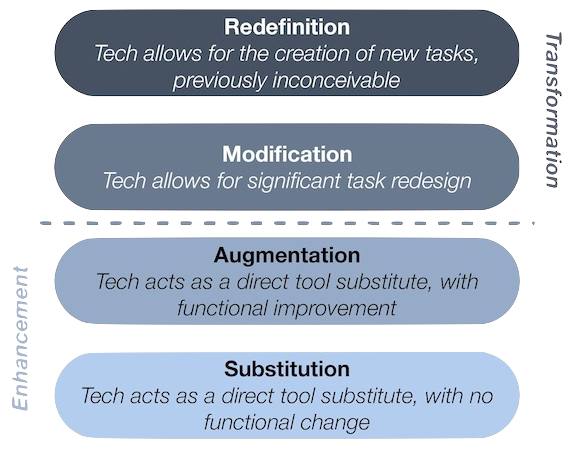
The SAMR model was developed in 2010 by education researcher Ruben Puentedura and lays out four tiers of online learning, presented roughly in order of their transformative power.
SAMR is a reflection tool that can help educators think about how digital technology integration is supporting learning in specific blended learning lessons and activities.
The SAMR model gives educators a common way of communicating about technology integration. The SAMR framework can help us talk about the ways we are using technology, assess technologies to see how they will fit our context and help us plan future uses.
SAMR helps us ask and answer questions about what teachers and learners will gain from the technology before implementing it.
SAMR should not be regarded as a mountain to climb. Good technology integration isn’t about living at the top of the SAMR model; it’s about being aware of the range of options and picking the right strategy—or strategies—for each context and learning outcome.
Dr. Puentedura proposed that curriculum becomes more learner-centred and activities become more learner-driven as we move from substitution to redefinition but, teachers have to consider the capacity of the program to support inventive uses of technology and the capacity of learners to use technology in inventive ways.
When planning the integration of digital technology into activities, lessons and curriculum, teachers often start with substitution and modification. As teachers and learners become comfortable in a technologically enhanced learning environment, the last two levels of the SAMR model—modification and redefinition—can be added to the mix.