Our daily life and AI
Artificial intelligence is now widespread, and more people are using it regularly at work and in their personal lives. The changes brought about by this technology require us to develop critical thinking skills to remain informed citizens and stay in control of our digital environment. We have been researching learning resources that can help learners understand the presence of artificial intelligence in their daily lives. In a series of workshops held on February 5, 12, 19, and 26, 2026, we invited participants to explore them with us and curate your own collection.
We took a look at learning resources that:
- Enhance our knowledge of how AI works and how to evaluate its outputs
- Expand our capacity to detect images and content produced by AI
- Encourage learners to reflect on the use of AI in their learning journey
These resources include teacher-facing guides, instructions, objectives and/or teaching tips and support instructors to:
- Cover a topic comprehensively.
- Build a series of lessons that flow together.
- Co-learn rather than feel pressure to be the expert.
Workshop 1: What is AI?
Lessons and activities that help learners understand what AI is and how it works.
- CTRL-F
- Common Sense Education – What is AI? and How is AI trained?
- Khan Academy – What is AI? and How is AI trained?
- Google applied digital skills: Discover AI in Daily Life – Online course
- Code.org Youtube Channel
From Jeremy Marks: We have a deep fake document we developed in 2024 which you can access on our Literacy Link website. However, it is due for further research. https://irp.cdn-website.com/1a9192fe/files/uploaded/Combatting+Deep+Fakes+in+Generative+AI+%282024%29.pdf
From Andy Walton: This is a useful resource for teachers. https://usergeneratededucation.wordpress.com/wp-content/uploads/2023/01/a-teachers-prompt-guide-to-chatgpt-aligned-with-what-works-best.pdf

Workshop 2: AI and Disinformation
Lessons and activities that help learners develop strategies to verify information in a landscape where
AI is used to create content.
- From Tracey Mollins: I did not share the link but I mentioned this.
- Perry Carpenter and FAIK – https://www.thisbookisfaik.com/
- He is selling a book but there are some good articles under the resources tab. This one describes the FAIK framework: The FAIK Factor: Your Shield Against Digital Deception
- It is basically lateral reading and very similar to the SIFT framework that CTRL-F uses but some of the ways he talks about emotional intelligence is interesting.
Workshop 3: AI Ethics and Bias
Lessons and activities that help learners explore ethical questions
about using AI and how AI perpetuates biases and
stereotypes.
Links from AI in Daily Life Workshop 3 slides
Workshop 4: AI in the Classroom
Lessons and activities for discussing AI guidelines and using
AI to complete tasks.
Links shared in Workshop 4
Links from AI in Daily Life Workshop 4 slides
- AlphaPlus AI resource list
- AI to Create and Manage Learning Activities by Shawn McCusker: 2024 12 AI for Educators
AI and Climate
AI and intellectual property (copyright) transparency
- Citing generative AI – U of Ottawa
- This page is in French but for English speakers, a description of the logos is available in English.
AI Literacy Day
An initiative from MediaSmarts at https://mediasmarts.ca/canada-ai-literacy-day
This resource from AlphaPlus was created by Tracey Mollins after a workshop series called AI in daily life: Exploring Learning Resources.
Learn Together: Creative Writing (Poetry) – Express yourself creatively
In June 2026 we facilitated a 3-part exploration of how to keep creativity flowing in the literacy classroom. We are going to take a dive into resources, tools and approaches that support creative writing instruction. We
- Explored lesson plans that encourage creative expression, reading and writing.
- Provided opportunities for participants to into your their creativity.
- Expanded participant lists of Open Education Resources.
- Experimented with digital tools that can support writing skills and the development of digital competencies.
We took a look at learning resources that:
- Enhance our knowledge of how AI works and how to evaluate its outputs
- Expand our capacity to detect images and content produced by AI
- Encourage learners to reflect on the use of AI in their learning journey
These resources include teacher-facing guides, instructions, objectives and/or teaching tips and support instructors to:
- Cover a topic comprehensively.
- Build a series of lessons that flow together.
- Co-learn rather than feel pressure to be the expert.
You can find links to all the resources we used in the workshops in this document.
Workshop 1:
Creating something from something
We explored how we can create poetry even if we have never read or written a poem
before. We looked at
- how creating something from something fosters a growth mindset.
- two resources for learning about what poetry is;
- two forms of found poetry that are a place to start;
Workshop 2:
Quiet observations and form poems
We explored how we can create poetry from our own experiences and our own lives.
We looked at
- a poem created from an observation and a question;
- how that poem inspired action;
- how images can inspire creativity;
- how form poetry can help us start creating;
- and a little on how to find images that we can use.
Workshop 3:
Poetry grows our hearts
We explored how we can learn about poetry by experiencing it in different formats.
We looked at
- how poetry gets in our hearts;
- places to read and hear poems;
- how reading poems, listening to poems, and reading poems out loud help us to understand poetry.
This resource from AlphaPlus was created by Tracey Mollins after a workshop series called Resources and tools to support creative writing instruction.
How can we (literacy practitioners) use what we know about learners’ daily lives to better answer their learning needs?
In a series of 3 workshops on Wednesday, January 14, 21, 28, 2026 we explored different ways to use learners’ daily digital tasks to create activities that develop digital skills, other skills and knowledge.
We looked at how to go from a simple daily activity such as using a web mapping app to identify digital skills that can be developed through various means and
- Develop a practice of integrating daily life apps and websites into curriculum and lesson plans
- Explore how integrating daily-life technology supports literacy learning
- Expand your list of apps and websites that support learners in completing daily life tasks and accessing resources
Workshop 1: Search
Basic searches, AI augmented searches and using chatbots to get answers to questions, using search skills on websites.
Learn about basic search
Basic Search – 3 lessons and a practice: Search engines, Basic search, Ads in search results.
Learn about AI-augmented search
AI-Augmented Search Lesson Plan – CTRL-F Online Search Skills Lesson 2
Lateral reading: CTRL- F has a series of lessons and videos based on the SIFT method.
Learn about chatbot search
Coding Ireland Digital Skills Curriculum: Using AI for Web Searches
This lesson explores how AI is transforming the way we conduct web searches. The lesson gives learners the opportunity to compare traditional search engines with AI-powered tools and discuss the appropriate situations for using each.
PBS News Hour Classroom: AI Unlocked — finding facts with generative AI search
This lesson teaches students how AI responds to different types of prompts and how prompt engineering might be able to help them generate additional information.
Using Search skills on websites – Housing Rights
Steps to Justice website from CLEO (Community Legal Education Ontario)
- Free information about legal problems in Ontario.
- Reliable, practical, and easy to understand.
- Written by lawyers and edited by trained plain language editors.
OJEN (Ontario Justice Education Network) A Foot in the Door
This 6-module resource, produced by the Lawyers’ Professional Indemnity Company (LAWPRO) and the Ontario Justice Education Network (OJEN), provides an introduction to real estate and housing law in Ontario, including the various considerations and processes involved in purchasing and renting a home.
Workshop 2: Reading
Reading the news and using the library.
Reading the news
Media Smarts lessons
Libraries
Using the Libby app
Links from the chat
Workshop 3: Creating
Creating a budget, using a shopping app and storytelling with Google maps.
Budgeting and shopping
- Your budget @ Desjardins
- AlphaPlus OER – Numeracy in Daily Life
- AlphaPlus Useful Apps
- Shopping with Flipp activity
Maps and stories
Learn about mapping
Google: Create or open a map
Maps and stories lesson plans
Google Applied Digital Skills – My Maps activities
The GFCGlobal link in the slides that went missing can be viewed in the Wayback Machine (crawled on December 31, 2025) here: https://web.archive.org/web/20251231202220/https://edu.gcfglobal.org/en/google-maps/
I tried to replicate the tutorials here: LearnFree Maps Tutorials
Links from the chat
- Government of Canada Budgeting Site
- AlphaPlus Information Literacy Resources
- Google Applied Digital Skills
- AI for Educators (AlphaPlus and EdTechTeacher workshops):
This resource from AlphaPlus was created by Tracey Mollins after a workshop series called Digital Technology in Daily Life.
Why is it important for us to understand this?
An essential 21st century skill is learning how to distinguish information that is reliable from disinformation, misinformation and fake news. Information literacy requires an understanding of the media landscape and knowledge about how to use our critical thinking skills in this landscape.
If we understand a little about how algorithms shape the attention economy, it helps us analyze and evaluate the media we are consuming and interacting with.
Algorithms and the Attention Economy
Algorithms are sets of rules or series of steps. Today, algorithms are generally understood as processes run by computers that take inputs and produce outputs. Online algorithms collect information from people and websites and apps use that information to decide what to show you. Here are some examples:
- Search engines – like Google – try to show you results it thinks are relevant and useful
- Social media sites use algorithms to recommend what it thinks you will want to look at
- Video streaming services (like Netflix, Amazon Prime, Disney+, YouTube, and others) use algorithms to suggest what to watch next.
The attention economy is an online business model in which tech companies compete for people’s attention — while also gathering data about them — to serve them personalized ads.
Building lessons with practitioners
How can we understand how algorithms work and how they shape our online experience?
One place to find lessons to help us learn the skills and knowledge we need is CTRL-F.
In this resource we explore the CTRL-F algorithm lesson.
In this lesson, participants:
- demonstrate an understanding of algorithms
- explain how Google uses algorithms to provide search results
- analyze how algorithms can be manipulated
See all Information Literacy Resources.
Why is it important for us to understand this?
An essential 21st century skill is learning how to distinguish information that is reliable from disinformation, misinformation and fake news. Information literacy requires an understanding of the media landscape and knowledge about how to use our critical thinking skills in this landscape.
If we understand a little about how to verify information, it helps us analyze and evaluate the media we are consuming and interacting with and stops us from spreading misinformation.
Misinformation, disinformation and fake news
- Disinformation is information that is false or distorts reality. It is transmitted by means of mass media or social media. Its aim is to manipulate public opinion.
- Fake news is a publication that has the same structure as a news article, but contains exaggerated, distorted or false information. Fake news is a form of disinformation.
- Misinformation is information transmitted by mass media or social media that is considered to be truthful by the transmitter, but, in reality, distorts facts or is wrong.
Read more here: What is disinformation? (activities to do with learners)
Building lessons with practitioners
How can we verify the information we see online and make sure we are not spreading misinformation?
One place to find lessons to help us learn the skills and knowledge we need is MediaSmarts.
In this resource we explore part of a MediaSmarts lesson called Break the Fake: Verifying Information Online to help us build our resilience to online misinformation.
In this lesson, participants:
- Learn simple steps for verifying online information
- Practice verifying online information
- Understand digital literacy key concepts
- Create a media text
See all Information Literacy Resources.
What are information zones?
Information can be categorized into one of six “zones”: news, opinion, entertainment, advertising, propaganda or raw information.
Each category has a primary purpose: to inform, to persuade, to entertain, to sell, to provoke or to document.
Why is it important for us to understand this?
An essential 21st century skill is learning how to distinguish information that is reliable from disinformation, misinformation and fake news. Information literacy requires an understanding of the media landscape and knowledge about how to use our critical thinking skills in this landscape.
If we understand a little about the purposes of different forms of information, it helps us analyze and evaluate the media we are consuming and interacting with. If we confuse the categories, we can ascribe incorrect purposes to the information we access.
Building lessons with practitioners
In our recent Information Literacy series, we looked at some possibilities for how to combine News Literacy Project and Checkology curriculum resources to create an Information Zones lesson for emergent readers.
The News Literacy Project is a website designed to help teachers make sure that students are skilled in news literacy and develop the knowledge and ability to participate in their communities as well-informed, critical thinkers. Checkology is a virtual classroom from the News Literacy Project. Many of the lessons on this site are presented by working journalists.
See all Information Literacy Resources.
How do journalists and editors decide what news to cover and which stories to promote to readers and news consumers? Why is it important for us to understand this?
An essential 21st century skill is learning how to distinguish information that is reliable from disinformation, misinformation and fake news. Information literacy requires an understanding of the media landscape and knowledge about how to use our critical thinking skills in this landscape. The decisions journalists and editors make are important to all of us as they shape the news media landscape. If we understand a little about how these decisions are made, it helps us analyze and evaluate the media we are consuming and interacting with.
Building curriculum with practitioners
In our recent Information Literacy series, we looked at some possibilities for how to combine News Literacy Project activities and Checkology lessons to create an Understanding Journalism curriculum for emergent readers.
The News Literacy Project is a website designed to help teachers make sure that students are skilled in news literacy and develop the knowledge and ability to participate in their communities as well-informed, critical thinkers. Checkology is a virtual classroom from the News Literacy Project. Many of the lessons on this site are presented by working journalists.
See all Information Literacy Resources.
Our idea that literacy workers might be interested in AI policies and guidelines came from a question that a literacy instructor asked in an Ai for Educators workshop, “I showed a learner how to use AI to get help on a simple task. Now that learner is using AI for everything. I feel that this is hindering them in developing some skills that they will need. How can I get them to stop?”
The facilitator, Shawn McCusker, suggested, “Work with the learner to create guidelines that work for you and that specific learner or group of learners in the specific contexts where they are learning.”
We thought this made sense. AI is so new that there are no great templates for the use of AI in adult literacy classrooms. Literacy instructors work with learners to create guidelines for the ways they will work together and are used to facilitating this process.
Here are three workshops presented by AlphaPlus where we discussed the topic of how to create a set of classroom AI guidelines to determine ways teachers and learners can use AI to support teaching and learning in specific contexts. We kicked off the conversation at a Showcase and took a deeper dive into the particulars and how tos in a series of workshops.
To see more about using AI in educational settings, check out our What is Generative AI? resource.
Virtual Showcase: AI policies, ethics and practices in LBS
“In this Showcase, three guest presenters plus three AlphaPlus staff members (Alan, Guylaine and Tracey) discussed how they are integrating AI into their practice and how they are thinking about AI policies and guidelines for organizations and for classrooms.” (November 2024)
Creating AI Policy with Learners
“This three-workshop series, facilitated by Tom Driscoll, is about what an AI policy for adult learners in literacy could look like. We will look at how to work with learners to create a policy that offers guidance for using AI ethically and safely to do research, make material more accessible and support creativity, communication and collaboration.” On the Padlet board, you can see how literacy instructors responded to the scenarios with thoughtful and well reasoned ideas about when using AI can support learning and when it can hinder developing certain skills and knowledge. (January 2025)
- Workshop 1 Slides and Recording
- Workshop 2 Slides and Recording
- Workshop 3 Slides and Recording and Padlet
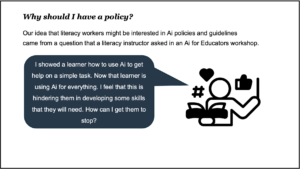
AI Policy for Literacy Practitioners and Learners
AlphaPlus was invited by Calgary Learns to expand on part of what we presented at the November 2024 Showcase. Guylaine and Tracey facilitated the discussion. “Generative Ai for teaching and learning is still a relatively new technology. In this workshop, facilitated by AlphaPlus practitioners, we will discuss the why and when of using generative Ai tools in adult education classrooms. As the technology and our practices evolve, so do our questions. We will share some of the questions we have been grappling with and invite participants to add theirs to the conversation.” The stoplight discussion is one way to start the conversation about AI use with colleagues and learners. (Calgary Learns, April 2025)
Stoplight Discussion Template
Disinformation is false information or information that distorts reality. Disinformation is intended to manipulate public opinion. Most of the time, it is transmitted through mass media or social media. There are several causes for the spread of false information and these can have serious consequences. Disinformation can affect citizens of all ages and education levels. There are ways to reduce the spread of disinformation.